


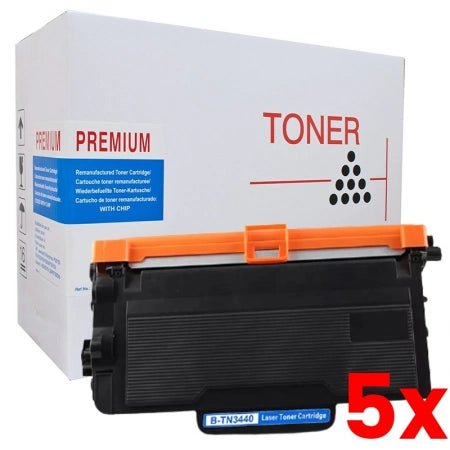
5 X Brother TN3440 White Box Toner Cartridge - 8000 Pages
- Sku: 5XBR3440CWB
- Vendor: Compatible Toner
- Type: Brother Mono Device - Compatible Toner
Our Price:
- About White Box Toner
- "White Box premium compatible toner is manufactured using quality components and undergoes thorough post-production tests to ensure high performance and excellent results comparable to the genuine branded cartridges. White Box Cartridges produce a better and superb print quality while saving as much as 50% on cost without sacrificing print quality and printer performance."
| Brother OEM Code |
TN-3440 |
| Brand |
Brother |
| Print Yield |
It has an estimated page yield of 8,000 pages. |
| Manufacture Type |
Premium White Box Compatible |
| Product Type |
This is a compatible Brother TN-3440 Black Toner cartridge. it deliveres an estimated page yield of 8,000 printes. The Toner is compatible with a range of the below Brother printers, It contains a single Black toner cartridge, it comes with a 100% quality guaranteed, and 100% product replacement warranty. |
| Colour |
Black |
| How to install White Box Brother TN3440 Toner in the Brother Laser Printer |
The Brother machine has separate consumables the toner cartridge and the drum unit. Verify you replace only the toner cartridge and not the drum unit. Follow the steps below to clear the Replace Toner message. 1. Make sure that the machine is turned on. Open the front cover. 2. Remove the toner cartridge and drum unit assembly from the machine. 3. Push down the green lock lever and take the toner cartridge out of the drum unit. 4. Unpack the new toner cartridge. Remove the protective cover. 5. Put the new toner cartridge firmly into the drum unit until you hear it lock into place. 6. Make sure you put the toner cartridge in correctly or it may separate from the drum unit. 7. Clean the corona wire inside the drum unit by gently sliding the green tab from left to right and right to left several times. 8. Be sure to return the tab to the Home position (). The arrow on the tab must be aligned with the arrow on the drum unit. If it is not, printed pages may have a vertical stripe. 9. Install the toner cartridge and drum unit assembly back into the machine. 10. Close the front cover of the machine. After replacing a toner cartridge, DO NOT turn off the machine or open the Front cover until the machines display returns to Ready Mode. |
| TN-3440 Product Description |
This Brother TN-3440 Black Toner Cartridge is great for ensuring that your printer continues to produce sharp, crisp and professional documents. Its specially designed to work with Brother printers and is easy to install so you can do it yourself. The toner is designed to work at specific temperatures for great quality print results. 100% warranty. Easy to install and exceptional print quality time after time print after print. |
| Item name | 1x White Box Brother TN-3440 Black Toner Cartridge |
Delivery Information
When purchasing from Inkmasters.net.au, you will enjoy fast delivery to most parts of Australia, we use a range of courier services, depending on location and efficiency.
All in stock items will be dispatched same day for orders placed before 2pm.
Shipping Charges
We offer free shipping for PPE and toner orders over $199.
Deliveries to rural and country areas, including NT and WA, and for large or bulky items, additional freight charges may apply. To confirm any extra delivery costs, please contact us at 1300 898 591. Alternatively, our friendly staff will contact you to provide a quote for the actual freight charges. You can choose to accept or decline the quote. If you accept, we will invoice you for the charges. If you decline, we may need to cancel your order and issue a refund if it has already been paid.
Have a question?
5 X Brother TN3440 White Box Toner Cartridge - 8000 Pages